Blog

  • E-Book-Analysis-And-Representation

    E-Book-Analysis-And-Representation

    Introduction

    E-books are getting more popular day by day. This project was about E-books. The frequencies of the words of the e-books on the wikibooks.org were examined and the most common words in the book were examined. While this study was being carried out, words that did not mean anything by themselves, called stop words, were not included in the study, as their amount could be really high. Later, two e-books were examined, and the multi-frequency words that were common in both and the distinct words found separately.

    When the application is executed, a menu appears on the console screen from which the user decides whether they want to analyze a single book or two books. After the user gives the name of the book as input, the book, if available, is taken from the Wikibooks website and saved in a text file. Then, as a result of the necessary analysis, the requested information is displayed.

    Methodology

    The project starts with a menu on the console. This menu is inside a while loop unless “Q” for Quit operation is entered, the program continues.

    When 1 is entered, the program asks for the name of the e-book and the number of words that is wanted to be listed. The given book name is sent to a method called createBook(). createBook() method is used for getting each book from the website. It creates the content of the e-book. A popular web scraping library that is called Beautiful Soup is used to getting the text from the website. There are two possible URLs and if one is not working the other usually works. I use a try-except structure so that the program wouldn’t stop suddenly.

    With beautiful soup library, I find the text as an HTML element and get its inner text with get_text() method. If the book is not valid or available, the program returns a message and it displays menu again. Here I used the “continue” keyword. That keyword is used to go back to where the iteration starts. So the program displays the menu.

    File operations are used to read and write on files. The result that we get from web scrapping (the content of the e-book) is then written into a file. After all file operations, we need to close the files. encoding=’utf-8′ was important, because the result was only writeable to utf-8 files.

    For analysis, the stop words must have been discarded. clearText() method clears the text that has stop words. All stop words, numerals, punctuations and letters were discarded from the whole text. I added them into a list and if a key from the dictionary is on that list I marked them to not to use. The text becomes ready to analyze. The returned dictionary from clearText() method has no stop words and all the values are the amounts of the keys.

    After that, with for loop, I compare all of the values in the dictionary and find the top ones. If there is a given amount, we take top X, but the default value for X is 20.

    When the X most valued words are displayed in order, the program returns to the menu again.

    If 2 is entered, 2 book names are taken from the user and the books are created. The stop words are discarded as I mention above.

    Then, findCommonWords() method is used to compare dictionaries and finds common words. It finds the words that both books include. And as the reverse of findCommonWords(), findDistinctWords() method compares two dictionaries and finds distinct words. When these dictionaries are created, their values are compared like in the first option. The results are displayed.

    Dictionary data structure is mostly used. Dictionaries have key and value pairs. That feature of dictionaries helped me to store the amount of each word and made me reach them easily.

    LICENSE

    MIT LICENSE

    Visit original content creator repository

  • appium-webdriverio-cucumber

    FOLDER STRUCTURE HIERARCHY

    .
    └── appium-webdriverio-cucumber/
        ├── allure-reports(contains report after test execution)/
        │   └── index.html(open with browser)
        ├── app/
        │   └── andriod/
        │       └── application.apk(android apk used)
        ├── features/
        │   ├── pageObjects(Page specific pom classes)
        │   ├── stepDefinitions(Step definitions of feature file to page Objects)
        │   └── login.feature(Gherkin BDD cucumber)
        ├── testdata/
        │   └── testdata.js(Separated dynamic testdata logic)
        ├── .gitignore
        ├── LICENSE
        ├── README.md
        ├── package-lock.json
        └── package.json


    TECH STACK USED(latest versions)

    APPIUM 2.10.3
    WEBDRIVER IO 8.39.0
    NODE 20.10.0
    JAVASCRIPT
    CUCUMBER 8.39.0
    ANDRIOD STUDIO 2023
    APPIUM INSPECTOR 2023
    DEVICE: PIXEL XL GOOGLE
    VERSION: ANDRIOD 13 TIRAMISU
    APPLICATION: Android.SauceLabs.Mobile.Sample.app.2.7.1.apk

    PREREQUISITES

    Node.js and npm
    Java Development Kit (JDK)
    Android SDK (for Android automation)
    Appium
    WebdriverIO CLI
    Drivers (e.g., UI Automator 2)
    Git
    An IDE (e.g., Visual Studio Code)

    COMMAND TO RUN

    npm install
    

    Run all testcases

    npx wdio wdio.conf.js
    

    Run individually

    npx wdio --spec .\features\login.feature
    

    Run from tags directly from CLI

    npx wdio wdio.conf.js --cucumberOpts.tagExpression='@yourTag'
    

    Note:

    1)Device/Emulator running

    2)Port 4723 is not occupied by any other process or service

    Command to check which process running on port and stop it.

    netstat -ano | findstr :4723 
    taskkill /PID <PID> /F
    

    RUN VIA TAGS

    By setting cucumberOpts as tagExpression: ‘@validUser’ in file wdio.config.js

    
    tagExpression: '@validUser',


    SPECS in wdio.config.js

    specs: [
    './features/**/*.feature'
    ],
    

    CAPABILITIES

    capabilities: [{
    // capabilities for local Appium web tests on an Android Emulator
    platformName: 'Android',
    'appium:deviceName': 'Demo',
    'appium:platformVersion': '13.0',
    'appium:automationName': 'UiAutomator2',
    'appium:app': path.join(process.cwd(), './app/andriod/Android.SauceLabs.Mobile.Sample.app.2.7.1.apk'),
    "appium:appActivity": "com.swaglabsmobileapp.MainActivity",
    "appium:appPackage": "com.swaglabsmobileapp",
    'appium:noReset': false,
    'appium:newCommandTimeout': 7200,
    'appium:fullReset': true,
    }],
    

    SERVICES AND LOGGING

    services: [
    ['appium', {
    args: {
    address: '127.0.0.1',
    port: 4723
    },
    command: 'appium',
    logPath: './'
    }]
    ],
    

    STEP DEFINITION

    wdio.conf.js in cucumberOpts add below:

    require: ['./features/step-definitions/*.js'],


    REPORTER: ALLURE

    docs:https://webdriver.io/docs/allure-reporter/

    npm install @wdio/allure-reporter –save-dev

    npm i allure-commandline

    Add below configurations:

    reporters: ['spec', ['allure', {
    outputDir: 'allure-results',
    disableWebdriverStepsReporting: true,
    disableWebdriverScreenshotsReporting: true,
    }]],
    
    onComplete: function () {
    const reportError = new Error('Could not generate Allure report')
    const generation = allure(['generate', 'allure-results', '--clean'])
    return new Promise((resolve, reject) => {
    const generationTimeout = setTimeout(
    () => reject(reportError), 5000)
    
                generation.on('exit', function (exitCode) {
                    clearTimeout(generationTimeout)
    
                    if (exitCode !== 0) {
                        return reject(reportError)
                    }
    
                    console.log('Allure report successfully generated')
                    resolve()
                })
            })
        }
    

    EXECUTION


    how.to.run.all.testcase.at.once.mp4


    TAGS EXECUTION


    how.run.testcase.with.tag.mp4


    REPORTS


    reporting.mp4


    Visit original content creator repository

  • ofxSlicer

    ofxSlicer

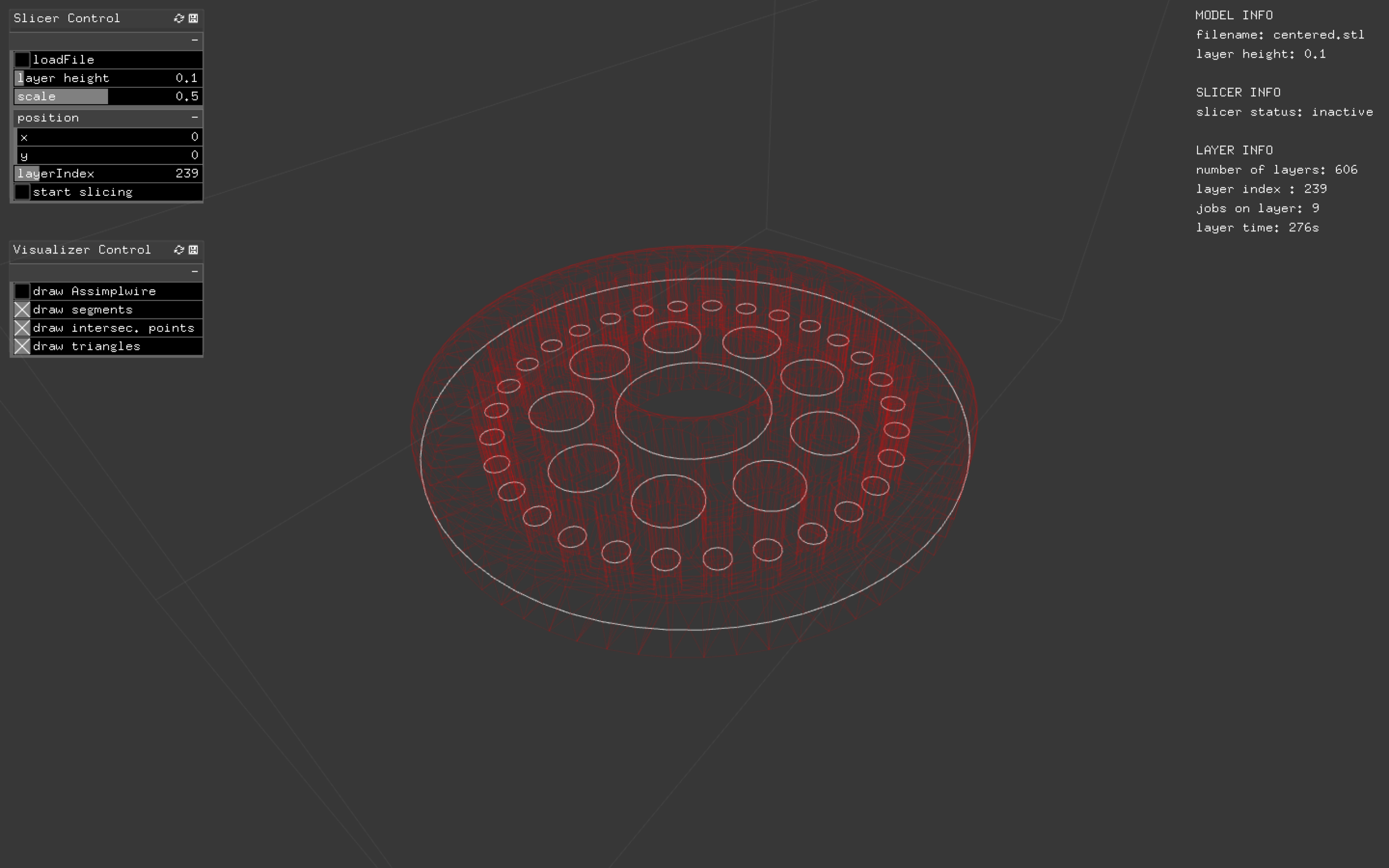
    Slices mesh geometry into layers consisting of curves. Written in c++ as an addon for Openframeworks. Currently missing any form of infill strategy and .gcode generation.

    current

    The Slicer

    The slicing algorithm goes something like this:

    1. Create a list containing all triangles of the mesh model.
    2. Mesh slicing: Calculate triangle intersection points on each plane.
    3. Construct contours: Create polygons from the intersection points for each plane.
    4. Make sence of the polygons (Clockwice/Counterclockwise)

    Full disclaimer. I´m new to C++, and by no means an expert in programming. I wanted to keep close track on how the memory is used and allocated by the slicer. Based on this I decided that C++ would be an optimal choise of language. I´m also having a really alright time with Openframeworks.

    Getting the triangles

    Getting the triangles was a bit of a struggle in Openframeworks. To import .stl files, I use the ofxAssimpModelLoader addon in openframeworks. It took some tweaking to get the triangle faces, with it´s belonging vertices extracted from the assimp class. All the triangles are sorted in ascending order in terms of the lowest point in the triangle. I have commented this in the code. NOTE: It would probaly be easier to use some kind of existing C++ framework for geometry like CGAL

    Calculate the triangle intersections

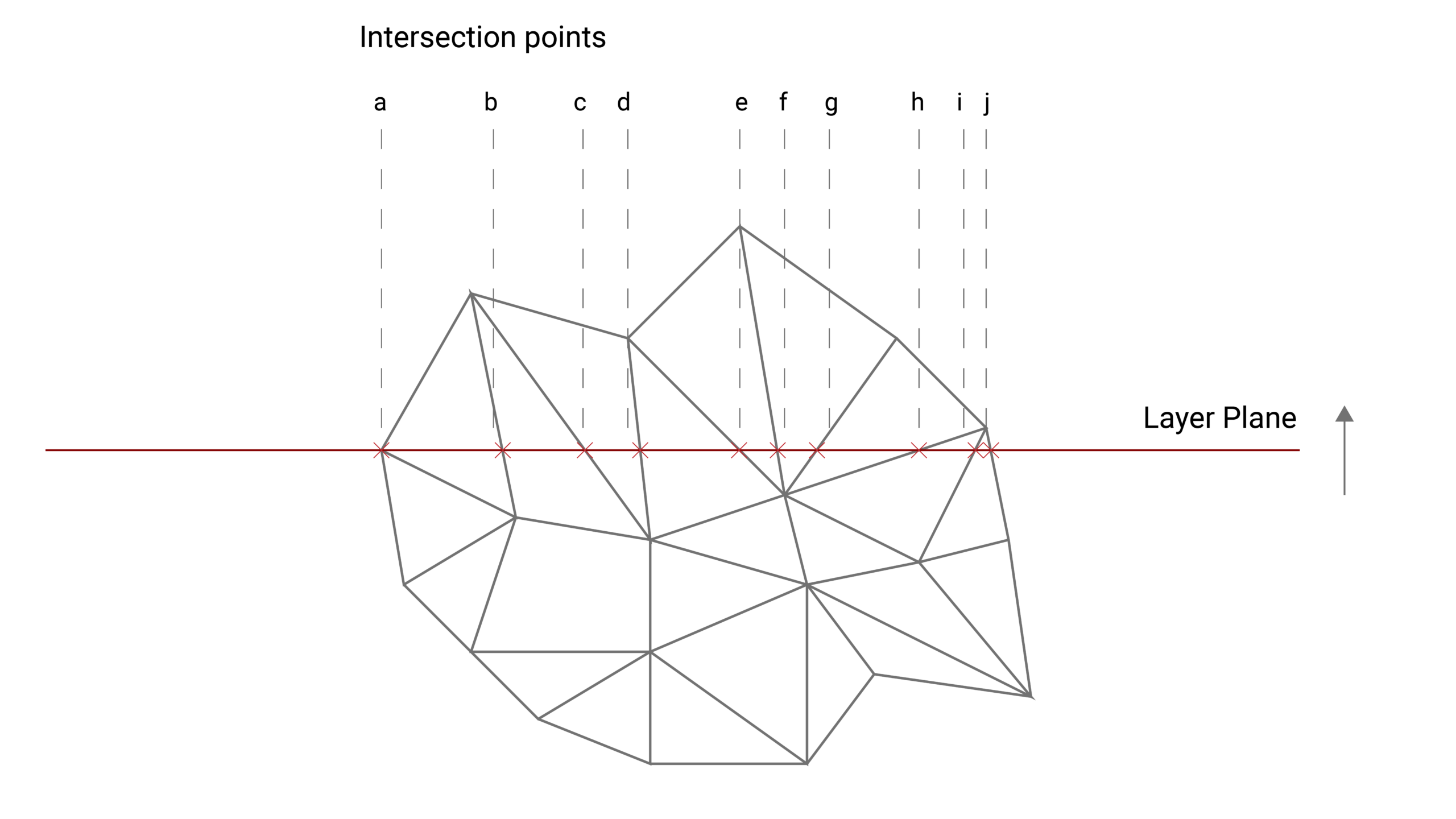
    Once we have the triangles it´s time to calculate the intersection points on each layer. Have a look at this figure.

    triangleInter

    I basically have three diferent situations.

    1. The triangle is located on the topside of the layer plane
    2. The triangle is intersecting with the plane.
    3. The triangle is underneath the plane. This means that the slicer is finished processing it.

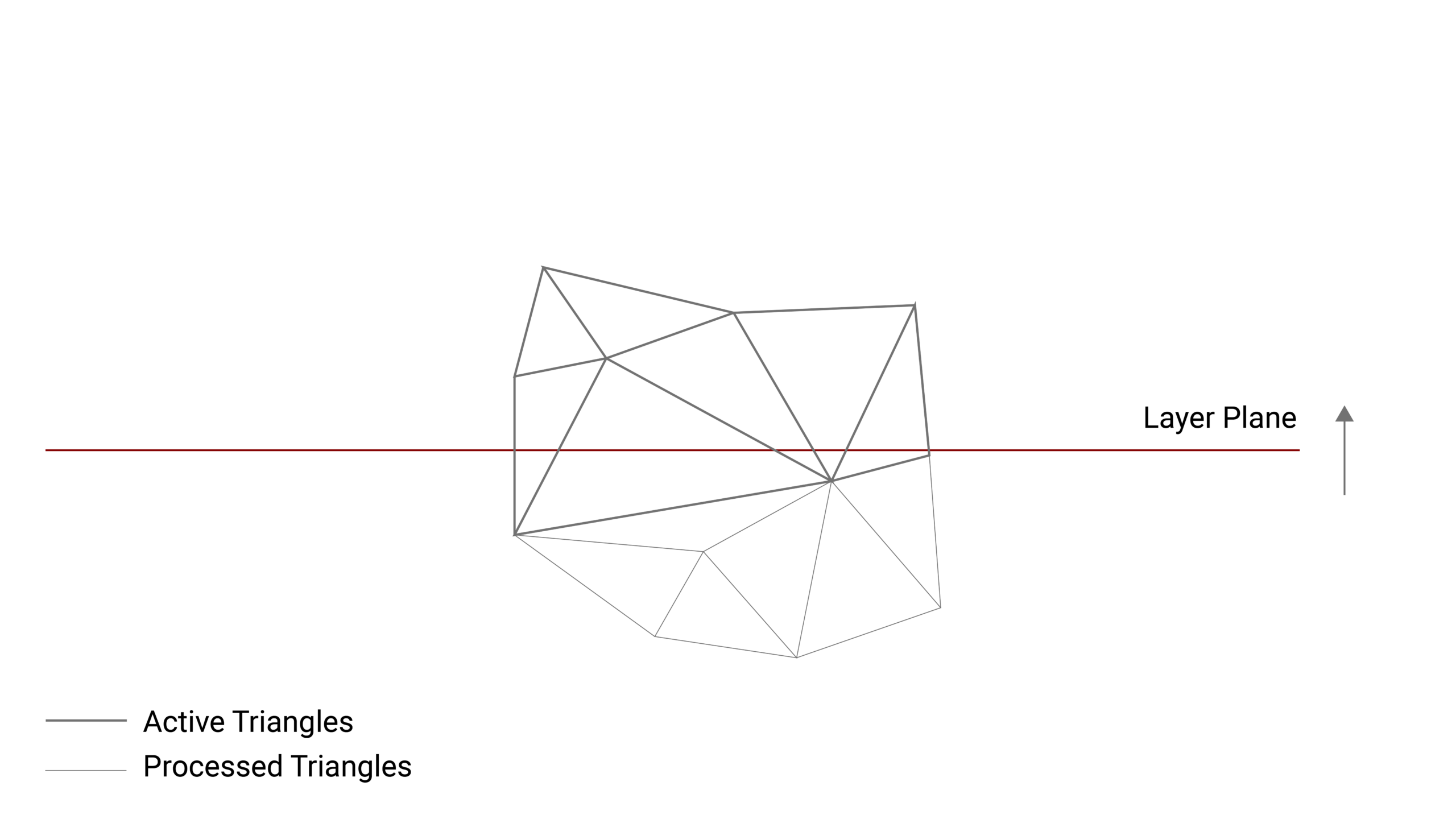
    Active triangles

    To improve the speed of the algorithm the triangles that are finished processed are removed from the triangle list that is used in the calculation. This condition applies when the entire triangle is located underneath the layer plane. See figure.

    active triangles

    Generate Polygons

    TODO: Come back and explain this

    How you can use it

    Reusing the slicer in your Openframeworks project should be pretty straightforward.

    • clone the git into your local addons folder
    • use the Openframeworks projectGenerator to include the ofxSlicer in your project
    • create an ofxSlicer object, feed it an stl and start slicing. Do a debug if your want to study how the data is structured.

    Visit original content creator repository
  • 42Webserv

    webserver

    • (автоперевод сабжекта, переведенного с французского на английский)

    Здесь вы окончательно поймете почему URL начинается с HTTP.
    Цель данного проекта написать собственный HTTP сервер. Вы должны будете протестировать его на реальном браузере. HTTP один из самых используемых протоколов в интернете. Знания в данной таинственной области является очень полезным для студента, даже если вы никогда не будете работать с веб-сайтами.

    Введение

    The Hypertext transfer protocol (Протокол передачи гипертекста) или HTTP — протокол прикладного уровня применяемый в распределенных, совместных и гипермедийных информационных системах.
    HTTP является фундаментом для передачи данных по Всемирной компьютерной сети (World Wide Web). В HTTP гипертекстовые документы включают в себя гиперссылки на другие ресурсы, к которым пользователь легко может получить доступ, например простой клик мышки по картинке в веб-браузере.
    Протокол HTTP был разработан, чтобы облегчить работу с гипертекстом, что в свою очередь облегчает работу со Всемирной сетью.
    Первичным функционалом веб-сервера являются хранение, обработка веб-страниц, также доставка веб-страниц клиентам.
    Связь между клиентом и сервером осуществляется за счет использования протокола передачи гипертекста HTTP.
    Обычно в качестве объекта доставки выступают HTML документы, которые могут включать изображения, таблицы стилей и скрипты в дополнении к текстовому контенту.
    Для веб-сайта с высоким трафиком могут использоваться несколько веб-серверов.
    В качестве агента пользователя в основном выступают веб-браузер или поисковый робот. Они начинают коммуникацию путем отправки запроса на получение определенного ресурса используя HTTP, и сервер в ответ отправляет содержимое ресурса, в ином случае сообщение об ошибке. Под ресурсом обычно имеется в виду реальный файл, находящийся во вторичном хранилище сервера, но это является необязательным кейсом и зависит от того как реализован веб-сервер.
    Если основной функционал веб-сервера занимается хранением, обработкой и доставкой контента, то в полной реализации веб-сервера включены разные способы получения контента от клиентов. Данная реализация дает возможность получения веб-форм, включая загрузку (upload) файлов.

    Основная часть

    Название программы: webserv
    Файлы: Любые
    Makefile: Необходим
    Функции: Все функции в С++ 98. htons, htonl, ntohs, ntohl, select, poll, epoll, kqueue, socket, accept, listen, send, recv, bind, connect, inet_addr, setsockopt, getsockname, fcntl.
    libft: Запрещен
    Описание: Напишите HTTP сервер на С++ 98. Однако всегда предпочтительнее использовать аналоги в С++.
    При программировании на С++ вы должны использовать С++98 стандарт. Ваш проект должен компилироваться в данном стандарте.
    Внешние библиотеки запрещены, Boost и т.д.
    Старайтесь всегда использовать С++ стиль написания кода (например вместо <string.h>)
    Ваш сервер должен быть совместим с веб-браузером, который вы выбрали.
    Мы будем предполагать, что Nginx совместим с HTTP 1.1 и может использоваться для сравнение заголовков и ответов.
    В сабже, а также в жизни мы рекомендуем вам использовать функцию poll, но вы можете использовать аналоги типа: select, kqueue, epoll.
    Сервер должен быть неблокирующим. И использовать только 1 poll(или аналог) для всех IO между клиентом и сервером(с учетом listens).
    poll(или аналог) должен проверять чтение и запись в одно и тоже время.
    Ваш сервер никогда не блокирует, и в случае необходимости клиент должен суметь отключиться.
    Вам нельзя производить операцию чтение и операцию записи без использования функции poll(или аналога).
    Вам запрещено проверять значения глобальной переменной errno после ошибки в функциях read и write.
    Запрос отправленный на ваш сервер не должен висеть вечно.
    Ваш сервер обязан иметь error page: стандартный или свой.
    Ваша программа не должна иметь утечек и не должна крашиться (даже при нехватке памяти, когда все уже инициализировано)
    Нельзя использовать fork, за исключением CGI.
    Нельзя запускать другой webserver через execve().
    Ваша программа должна иметь конфигурационный файл, который указывается либо как аргумент программы, либо должен быть статичным.
    Вам не надо использовать poll(или аналог) до чтения вашего конфигурационного файла.
    Ваш веб-сервер должен суметь обслужить полностью статичный сайт.
    Клиент должен иметь возможность загрузить(upload) файлы.
    Ваши HTTP статус-коды должны быть точны.
    Вы должны минимум реализовать методы GET, POST и DELETE.
    Ваш сервер должен любой ценной оставаться доступным, при любых стресс тестах.
    Ваш сервер должен иметь возможность прослушивать несколько портов.
    Вам разрешено использование fcntl, потому что в Mac OS X функция write реализована по-другому, нежели в других Unix OS!
    Вы должны использовать неблокируемый FD для того, чтобы получить аналогичное поведение (как в других OS).
    Благодаря использованию неблокируемого FD, вы сможете использовать функции read/recv или write/send без опроса(polling) и ваш сервер будет неблокирующим. Но мы против этого.
    Использование read/recv или write/send без опроса(polling) запрещено, в случае пренебрежения данного правила будет выставлена оценка 0.
    Вы можете использовать fcntl в следующей форме:
    fcntl(fd, F_SETFL, O_NONBLOCK);
    Любые другие флаги запрещены.
    Конфигурационный файл
    Вы можете вдохновить себя посмотрев конфигурационный файл Nginx, а именно часть ‘server’.
    В конфигурационном файле мы должны иметь следующие поля:
    Выбор порта и хоста для каждого ‘server'(обяз).
    Установка имени_сервера(необяз).
    Первый сервер для host:port должен быть дефолтным для этого host:port (это значит, что он должен отвечать на все запросы, которые не относятся другому серверу).
    Установка дефолтного error page.
    Лимит размера тела клиента.
    Установка маршрутов с одним или несколькими следующими правилами/конфигурациями (маршруты не будут использовать redexp):

    • Определить список разрешенных HTTP методов для маршрута.
    • Определить HTTP редиректы.
    • Определить директорию или расположение файла, где должен происходить поиск файла (для примера: если url /kapouet находится в /tmp/www, то url /kapouet/pouic/toto/pouet будет /tmp/www/pouic/toto/pouet)
    • Включить или выключить прослушивание директории.
    • Установка дефолтного файла, который будет отправлен как ответ в случае, если запрос является директорией.
    • Дать маршруту возможность загружать файлы и определить место их хранения.
    • Исполнение CGI на основе определенного расширения (например .php)
      — Знаете что такое CGI? → link.
      — Так как вы не будете вызывать CGI напрямую используйте полный путь как PATH_INFO.
      — Помните, что фрагментированный запрос должен быть обратно собран сервером и CGI будет ожидать EOF, в качестве конца тела.
      — Тоже самое применимо и для вывода CGI, если не указан content_length.
      — Ваша программа должна вызывать CGI вместе с файлом, который указан в качестве первого аргумента.
      — CGI должен запускаться в правильной директории для доступа к файлам по относительному пути.
      — Ваш сервер должен работать только с одним CGI (php-cgi, python…).
      Для проверки вы должны предоставить несколько конфигурационных файлов и базовые файлы по-умолчанию для тестирования.
      Если у вас возник вопрос по поводу некоторого поведения, вам следует сравнить это с Nginx. Например: проверьте как работает server_name. Мы также предоставили вам небольшой тестер, он не настолько хорошо, чтобы с ним сдать проект. Но он поможет вам словить некоторые особенные баги.
      Пожалуйста прочитайте RFC и проведите тесты с telnet и Nginx перед тем как начать этот проект. Даже если вы не будете реализовывать все в RFC, чтение всего RFC сильно поможет вам в реализации ваших функций.
      Самое главное — это устойчивость. Ваш сервер не должен умирать!
      Не тестируйте ваш проект только одной программой, напишите собственные тесты! Вы можете сделать это на любом языке программирования. Например: python, golang, C++, C и т.д.

    Бонусная часть

    Если основная часть неидеальная, даже не думайте про бонусы.
    Поддержка cookie и Управление сессиями (не забудьте тесты).
    Обработка нескольких CGI.

    Visit original content creator repository

  • noiserecorder

    Noise Recorder

    Retrieves white noise from the environment via the microphone and extracting the least significant bit.

    Invocation (Refer to steps below for installation)

    python -m noiserecorder --help

    Brings up help.

    python -m noiserecorder

    Generates 30 minutes (The user should be warned that this will take about 8 hours [30min (desired time)*16 (number of bits per sample)=8hrs]) of noise written to a dated file.

    python -m noiserecorder pathname/filename.wav

    Generates 30 minutes of noise written to a specific path.

    python -m noiserecorder pathname/filename.wav <duration_in_seconds>

    Generates specified duration of noise written to a specific path.

    Virtual Environment Requirements for Building

    The following packages are needed:

    System Requirements

    • Any system that supports Python.
      • Android /w Termux Installed?: Don’t even try it! I am not sure that Android’s permission system will allow audio to be recorded in the manner this software does (using sounddevice). I am not so sure about the python setup there. I have had problems with it before.
      • Anything OS not Windows/Linux/MacOS or anything running on a processor that is not Intel-based?: YMMV/I really don’t know. (Hmm. I smell a Raspberry Pi project)
      • Any of the above. Try and report.
      • ⚠️ Important Safety Tip For Android/Termux: Just in case somebody does manages to get this working on an Android phone running Termux, Please for the love of all that is Good and Holy, don’t waste your batteries, or at the very least have a friend that is not wasting their batteries when you are out in the middle of a wilderness and might get lost and need to call someone for help. Just in case gathering atmospheric noise in the middle of a desert or forest is tempting for you. I hear waterfalls are good sources of noise. Again, bring a friend with a charged phone not running this and stay safe! Remember it takes 16 seconds of recorded sound to generate 1 second of noise. Plus there is quite a bit of postprocessing at the end. I cannot be held responsible for someone getting lost or hurt and I do not want that for anybody either. So if you are going to proceed to gather noise from the wild natural environment, be thoughtful of the following: Be safe, be smart, be vigilent, and most importantly stay alive and unharmed, and are able to come back home when you are done! You have been duly warned.
      • 🗞️ News flash for Android/Termux: Portaudio library (sounddevice’s native dependency) does not work here.
    • Python 3.11 w/ pip (For best results use this version: You might be able to get away with using something as low as 3.9 but I strongly recommend using this listed version if you can)
    • virtualenv and/or venv python pip packages.

    Python Virtual Enviroment Packages (AKA don’t screw up your system’s python!)

    Install a virtual environment by doing the following: [You will have to replace the ~ with $env:USERPROFILE (powershell.exe/pwsh.exe) and /’s with ‘s if you are on Windows]

    python3.11 -m venv --copies --upgrade-deps ~/path/to/noiserecorder_venv

    Virtualenv Instructions:

    python3.11 -m virtualenv --copies ~/path/to/noiserecorder_venv

    If you are using Windows Store Version of Python:

    • Open Start Menu
    • Search for Python 3.11
    • Open Python 3.11

    In the Python Prompt do the following (One line at a time):

    import os
    os.system('pwsh') # Start Powershell

    Once in Powershell Subprocess do the following (One line at a time):

    cd # Go Home
    python -m venv --copies --upgrade-deps $env:USERPROFILE\path\to\noiserecorder_venv
    exit

    Exit Windows Store Python:

    exit()

    If you encounter access denied issues attempting to run python from the pwsh subshell, try this in the windows store python interactive shell (One line at a time):

    Python:

    import venv
    import os
    userdir = os.environ['USERPROFILE']
    venv.create(userdir + '\path\to\noiserecorder_venv',with_pip=True,upgrade_deps=True)
    exit()

    Enter your virtual environment:

    bash:

    . ~/path/to/noiserecorder-venv/bin/activate

    Windows powershell/pwsh:

    . $env:USERPROFILE\path\to\noiserecorder-venv\bin\Activate.ps1

    Windows powershell/pwsh (A virtual environment installed using Windows Store Python):

    . $env:USERPROFILE\path\to\noiserecorder-venv\Scripts\Activate.ps1

    • wheel (You really should install this by itself first.)
    • altgraph
    • auto-py-to-exe (Just in case you want to build an self-contained executable. [You probably shouldn’t! Your machine might flag the executable! ]
    • bottle
    • bottle-websocket
    • cffi
    • Eel
    • future
    • gevent
    • gevent-websocket
    • greenlet
    • idle
    • pefile
    • pip (You don’t have to install this venv/virtualenv should have done this for you.)
    • pycparser
    • pycryptodome (Encryption added for the peace of mind and privacy of any would be noise collector.)
    • pyinstaller
    • pyinstaller-hooks-contrib
    • pyparsing
    • setuptools (Same as pip, installed by virtual/venv already)
    • sounddevice (Lets grab some sound and make some noise with it!)
    • whichcraft
    • zope.event
    • zope.interface

    Install these packages in the virtual environment:

    bash:

    for f in wheel altgraph bottle bottle-websocket cffi Eel future gevent gevent-websocket \
    greenlet idle pefile pycparser pycryptodome pyinstaller \
    pyinstaller-hooks-contrib pyparsing sounddevice \
    whichcraft zope.event zope.interface
    do
        python -m pip install "$f"
    done

    pwsh (Windows):

    @('wheel','altgraph','bottle',
    'bottle-websocket','cffi','Eel','future','gevent',
    'gevent-websocket','greenlet','idle','pefile','pycparser',
    'pycryptodome','pyinstaller','pyinstaller-hooks-contrib','pyparsing',
    'sounddevice','whichcraft','zope.event','zope.interface') |
    ForEach-Object {& python -m pip install "$_"}

    Install noiserecorder itself:

    bash:

    # $PATH_TO_NOISERECORDER_SOURCE_MODULE is a stand-in for the actual path to your checked out copy of the noiserecorder module.
    python -m pip install $PATH_TO_NOISERECORDER_SOURCE # It is the top of this project folder that contains setup.py and this Readme.md file, it is NOT the inner noiserecorder package folder that contains __init__.py and friends.

    pwsh (Windows):

    # $env:PATH_TO_NOISERECORDER_SOURCE_MODULE is a stand-in for the actual path to your checked out out copy of the noiserecorder module.
    cd $env:PATH_TO_NOISERECORDER_SOURCE_MODULE
    & python -m pip install $env:PATH_TO_NOISERECORDER_SOURCE # It is the folder that contains setup.py and this Readme.md file, it is NOT the inner noiserecorder package folder that contains __init__.py and friends.

    Visit original content creator repository